Are you planning to host your website on Cloudways but not sure how much you will actually pay every month? Cloudways pricing is a bit different from the normal shared hosting you see everywhere, so many people get confused when they look at the Cloudways pricing page for the first time.
The cheapest Cloudways plan starts at $11 per month, and for this price you get a DigitalOcean Standard server with 1 GB RAM and 25 GB SSD storage. If you want the faster Premium server with NVMe storage, the same 1 GB plan costs $14 per month. Cloudways charges you on hourly basis for the time your server is running, they don’t ask you to pay 3 or 4 years in advance like most shared hosting companies, so you will not see any renewal price hike after a few years.
At the moment Cloudways is also running an offer with the coupon code TREAT26, which gives you 40% discount for the first four months. With this coupon the $11 server will cost you $6.60 per month, and the $14 Premium server $8.40 per month, for the first four months.
But the plan price you see on the Cloudways website is not your full monthly bill. Cloudways charges extra for things like backups and email, and on AWS and Google Cloud the bandwidth included with the plan is very low. In this article I have explained all the Cloudways plans first, after that I have listed the add-ons with their prices, and in the end I have worked out three real monthly bills so that you know how much you will actually pay.
All the prices mentioned in this article are taken from the Cloudways website, I checked them on 28 October 2026.
The cheapest Cloudways server costs $11 per month on DigitalOcean Standard, and $14 per month if you choose Premium with NVMe storage. Cloudways sends you the bill at the end of every month for the hours your server was running, and since there is no prepaid term the price does not go up at renewal. If you sign up with the coupon code TREAT26, the $11 server will cost you $6.60 per month for the first four months. Keep the backups ($0.033 per GB) and email ($1.50 per mailbox) in your budget as well, because they are not part of the plan price.
Cloudways Pricing 2026
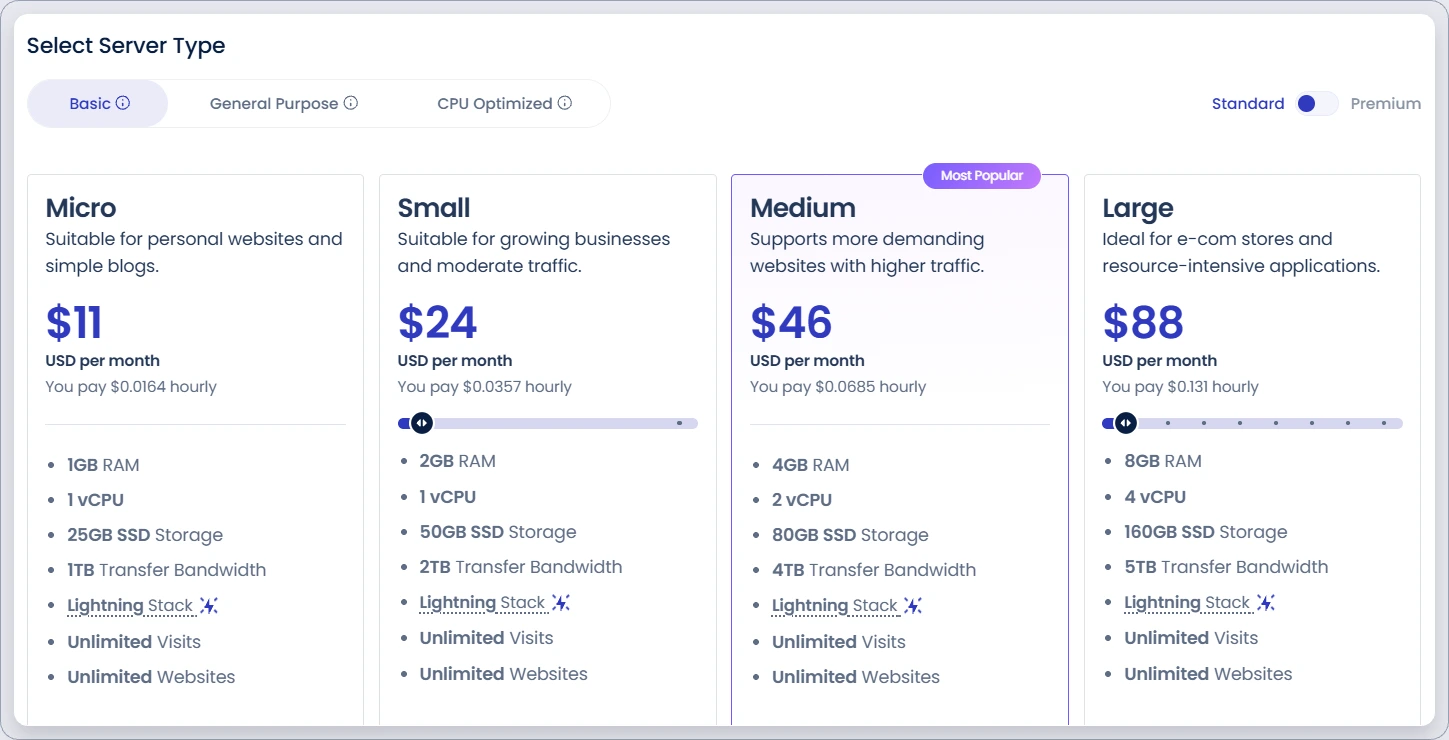
These four plans are the ones most people buy on Cloudways. DigitalOcean is the default cloud on Cloudways, and on its Basic server type you can choose Standard or Premium with a toggle on the right side of the pricing page.
| Plan | RAM / CPU | Storage | Bandwidth | Standard (SSD) | Premium (NVMe) | At renewal |
|---|---|---|---|---|---|---|
CWMicro | 1 GB / 1 vCPU | 25 GB | 1 TB | $11/mo | $14/mo | Same price |
CWSmallAlex’s pick | 2 GB / 1 vCPU | 50 GB | 2 TB | $24/mo | $28/mo | Same price |
CWMedium | 4 GB / 2 vCPU | 80 GB | 4 TB | $46/mo | $54/mo | Same price |
CWLarge | 8 GB / 4 vCPU | 160 GB | 5 TB | $88/mo | $99/mo | Same price |
Prices are in USD and tax is not included, taken from the Cloudways pricing page on 28 October 2026. RAM, CPU, storage size and bandwidth are the same on Standard and Premium, only the type of storage, CPU and network speed is different.
On every Cloudways plan you can host unlimited websites, the only limit is the RAM and CPU of your server, so you can keep adding websites till your server can handle them.
All Cloudways plans also include free SSL, a staging area where you can test changes before making them live, a server level firewall and 24/7 chat support. If you buy the 4 GB plan or any bigger plan, Cloudways also gives you Object Cache Pro for free, it is a paid caching plugin for WordPress that makes your website faster, and this is a good saving if you are running a busy website.
I have marked the 2 GB Small plan as my pick because in my opinion it is the right plan to start with for a normal business website. The 1 GB Micro plan works fine for one small blog, but if you are running a WooCommerce store or 3 to 4 websites on the same server, 1 GB RAM can become slow when many things are running at the same time, for example when a backup is running and visitors are also coming on your website.
Cloudways Pricing by Cloud Provider
On Cloudways you first have to choose the cloud company where your server will run, and the price changes a lot depending on which one you choose.
| Cloud and server type | 1 GB RAM | 2 GB RAM | 4 GB RAM | Bandwidth on the 1 GB plan | Storage type |
|---|---|---|---|---|---|
| DigitalOcean Basic Standard | $11 | $24 | $46 | 1 TB | SSD |
| DigitalOcean Basic Premium | $14 | $28 | $54 | 1 TB | NVMe |
| Vultr Standard | $14 | $28 | $54 | 1 TB | SSD |
| Vultr High Frequency | $16 | $30 | $60 | 1 TB | NVMe |
| Linode (Akamai) Standard | $14 | $28 | $59 | 1 TB | SSD |
| AWS Standard | $20.56 | $38.56 | $91.84 | 2 GB | 20 GB disk |
| Google Cloud Standard | $37.33 (1.7 GB) | Not offered | $84 (3.75 GB) | 1 GB | 20 GB disk |
Monthly prices in USD without tax, taken from the Cloudways pricing page on 28 October 2026. Google Cloud does not have 1, 2 and 4 GB plans so I have shown the nearest size in brackets, and AWS and Google Cloud prices can be different in other regions.
DigitalOcean Standard is the cheapest way to start on Cloudways at $11 for 1 GB, and every other cloud starts from $14 or more. On the 1, 2 and 4 GB plans DigitalOcean Premium, Vultr Standard and Linode cost almost the same, but DigitalOcean Premium gives you NVMe storage for that price while Vultr Standard and Linode are still using the older SSD storage.
AWS and Google Cloud are where most people get a surprise when the bill comes. The AWS 1 GB plan includes only 2 GB bandwidth for the whole month and Google Cloud includes only 1 GB, and Cloudways says that every extra GB on AWS is charged at $0.12.
For example, if 20,000 visitors open your website in a month and your page size is around 2 MB, you will use around 40 GB bandwidth, which means about $4.56 extra on AWS over and above your plan price. On DigitalOcean the same traffic is covered in the 1 TB bandwidth you get with the plan, and even if you cross it, extra bandwidth on DigitalOcean is only $0.02 per GB.
I suggest you go with AWS or Google Cloud only when you really need that company, like when your client asks for it. For a normal website DigitalOcean or Vultr gives you much better value for money. If you want to see every plan of one cloud provider, just click its name in the list above, I have made a separate price list for each of them below.
Cloudways DigitalOcean Pricing
DigitalOcean is the cloud Cloudways selects for you by default, and here you can choose from three DigitalOcean server types, Basic (in Standard or Premium), General Purpose and CPU Optimized.
| Server type | RAM | vCPU | Storage | Bandwidth | Per month | Per hour |
|---|---|---|---|---|---|---|
| Basic Standard | 1 GB | 1 | 25 GB SSD | 1 TB | $11 | $0.0164 |
| Basic Standard | 2 GB | 1 | 50 GB SSD | 2 TB | $24 | $0.0357 |
| Basic Standard | 4 GB | 2 | 80 GB SSD | 4 TB | $46 | $0.0685 |
| Basic Standard | 8 GB | 4 | 160 GB SSD | 5 TB | $88 | $0.131 |
| Basic Premium | 1 GB | 1 | 25 GB NVMe | 1 TB | $14 | $0.0208 |
| Basic PremiumAlex’s pick | 2 GB | 1 | 50 GB NVMe | 2 TB | $28 | $0.0417 |
| Basic Premium | 4 GB | 2 | 80 GB NVMe | 4 TB | $54 | $0.0804 |
| Basic Premium | 8 GB | 4 | 160 GB NVMe | 5 TB | $99 | $0.1473 |
| General Purpose | 8 GB | 2 | 30 GB NVMe | 4 TB | $106 | $0.1577 |
| General Purpose | 16 GB | 4 | 60 GB NVMe | 5 TB | $216 | $0.3214 |
| General Purpose | 32 GB | 8 | 120 GB NVMe | 6 TB | $395 | $0.5878 |
| General Purpose | 64 GB | 16 | 240 GB NVMe | 7 TB | $699 | $1.0402 |
| CPU Optimized | 8 GB | 4 | 50 GB NVMe | 5 TB | $164 | $0.244 |
| CPU Optimized | 16 GB | 8 | 100 GB NVMe | 6 TB | $308 | $0.4583 |
| CPU Optimized | 32 GB | 16 | 200 GB NVMe | 7 TB | $530 | $0.7887 |
| CPU Optimized | 64 GB | 32 | 400 GB NVMe | 9 TB | $967 | $1.439 |
USD without tax, from the Cloudways pricing page on 28 October 2026. The Standard and Premium toggle is only available on the Basic server type. The pricing page shows four sizes for every server type, and Cloudways shows the exact price of other sizes when you launch a server.
For most websites the Basic server type is enough, and it is also the cheapest one on DigitalOcean. Basic servers start with 1 GB RAM and go up to 8 GB RAM on this page, you can take them with SSD storage on Standard or NVMe storage on Premium, and the bandwidth goes from 1 TB on the smallest plan to 5 TB on the 8 GB plan.
General Purpose and CPU Optimized servers are made for heavy websites that keep the server busy all the time, like a big WooCommerce store or a membership website. But when you compare the 8 GB plans you will notice something strange, the General Purpose 8 GB server costs $106 per month and gives you only 2 vCPU with 30 GB storage, while the Basic Premium 8 GB server costs $99 and gives you 4 vCPU with 160 GB storage, and the Basic Standard 8 GB server is only $88. So unless Cloudways support tells you that your website really needs General Purpose, the Basic 8 GB plan gives you more for less money.
CPU Optimized starts at $164 per month for 8 GB RAM and 4 vCPU. It makes sense when your website does a lot of processing work, for example a store with thousands of products where people are using search and filters all day.
Cloudways lists 10 DigitalOcean data centers, including Bangalore and Singapore in Asia, New York, San Francisco and Atlanta in the US, and London, Amsterdam and Frankfurt in Europe, so you can pick the one which is closest to most of your visitors.
Cloudways Vultr Pricing
With Vultr you get four server types on Cloudways, Standard, High Frequency, General Purpose and CPU Optimized, and Cloudways says Vultr is available in 30 locations.
| Server type | RAM | vCPU | Storage | Bandwidth | Per month | Per hour |
|---|---|---|---|---|---|---|
| Standard | 1 GB | 1 | 25 GB SSD | 1 TB | $14 | $0.0208 |
| Standard | 2 GB | 1 | 55 GB SSD | 2 TB | $28 | $0.0417 |
| Standard | 4 GB | 2 | 80 GB SSD | 3 TB | $54 | $0.0804 |
| Standard | 8 GB | 4 | 160 GB SSD | 4 TB | $99 | $0.1473 |
| High Frequency | 1 GB | 1 | 32 GB NVMe | 1 TB | $16 | $0.0238 |
| High FrequencyAlex’s pick | 2 GB | 1 | 64 GB NVMe | 2 TB | $30 | $0.0446 |
| High Frequency | 4 GB | 2 | 128 GB NVMe | 3 TB | $60 | $0.0893 |
| High Frequency | 8 GB | 3 | 256 GB NVMe | 4 TB | $118 | $0.1756 |
| General Purpose | 4 GB | 1 | 30 GB NVMe | 4 TB | $72 | $0.1071 |
| General Purpose | 8 GB | 2 | 50 GB NVMe | 5 TB | $132 | $0.1964 |
| General Purpose | 16 GB | 4 | 80 GB NVMe | 6 TB | $193 | $0.2872 |
| General Purpose | 32 GB | 8 | 160 GB NVMe | 7 TB | $309 | $0.4598 |
| CPU Optimized | 2 GB | 1 | 25 GB NVMe | 4 TB | $57 | $0.0848 |
| CPU Optimized | 4 GB | 2 | 50 GB NVMe | 4 TB | $92 | $0.1369 |
| CPU Optimized | 8 GB | 4 | 75 GB NVMe | 6 TB | $141 | $0.2098 |
| CPU Optimized | 16 GB | 8 | 150 GB NVMe | 7 TB | $226 | $0.3363 |
USD without tax, from the Cloudways pricing page on 28 October 2026.
Vultr Standard costs the same as DigitalOcean Premium on the 1, 2, 4 and 8 GB plans, but Vultr Standard still uses SSD storage while DigitalOcean Premium gives you the faster NVMe storage at the same price. If you are fine with SSD storage, DigitalOcean Standard is $3 to $11 cheaper than Vultr Standard depending on the plan, so for a small website I don’t see much reason to pick Vultr Standard.
High Frequency is the Vultr server I would pick. It uses NVMe storage and also gives you more storage than DigitalOcean, like 64 GB on the 2 GB plan for $30 per month, which is only $2 more than DigitalOcean Premium. Just keep one thing in mind about the 8 GB High Frequency plan, it has 3 vCPU instead of 4 and costs $118 per month, that is $19 more than the DigitalOcean Premium 8 GB server.
General Purpose and CPU Optimized servers on Vultr start much higher, at $72 per month for 4 GB and $57 per month for 2 GB. The General Purpose 4 GB server has only 1 vCPU and 30 GB storage for $72, so for a normal WordPress website it is not a good deal.
Cloudways Linode Pricing
Linode is now owned by Akamai, and on Cloudways you get three Linode server types, Standard, General Purpose and CPU Optimized, in 25 data centers as per Cloudways.
| Server type | RAM | vCPU | Storage | Bandwidth | Per month | Per hour |
|---|---|---|---|---|---|---|
| Standard | 1 GB | 1 | 25 GB SSD | 1 TB | $14 | $0.0208 |
| Standard | 2 GB | 1 | 50 GB SSD | 2 TB | $28 | $0.0417 |
| Standard | 4 GB | 2 | 80 GB SSD | 4 TB | $59 | $0.0878 |
| Standard | 8 GB | 4 | 160 GB SSD | 5 TB | $105 | $0.1563 |
| General Purpose | 4 GB | 2 | 80 GB SSD | 4 TB | $69 | $0.1027 |
| General Purpose | 8 GB | 4 | 160 GB SSD | 5 TB | $115 | $0.1711 |
| General Purpose | 16 GB | 8 | 320 GB SSD | 6 TB | $216 | $0.3214 |
| General Purpose | 32 GB | 16 | 640 GB SSD | 7 TB | $418 | $0.622 |
| CPU Optimized | 4 GB | 2 | 80 GB SSD | 4 TB | $89 | $0.1324 |
| CPU Optimized | 8 GB | 4 | 160 GB SSD | 5 TB | $141 | $0.2098 |
| CPU Optimized | 16 GB | 8 | 320 GB SSD | 6 TB | $251 | $0.3735 |
| CPU Optimized | 32 GB | 16 | 640 GB SSD | 7 TB | $502 | $0.747 |
USD without tax, from the Cloudways pricing page on 28 October 2026.
Linode Standard costs $14 for 1 GB and $28 for 2 GB, which is the same as DigitalOcean Premium and $3 to $4 more than DigitalOcean Standard. From 4 GB onwards Linode becomes a little costlier than both, it is $59 against $54 on DigitalOcean Premium, and $105 against $99 on the 8 GB plan.
All Linode servers on Cloudways use SSD storage and not NVMe. But there is one good thing about Linode General Purpose and CPU Optimized servers, you get a lot more storage, 160 GB with 8 GB RAM and 320 GB with 16 GB RAM, which is much more than what DigitalOcean and Vultr give on their General Purpose plans.
I would choose Linode only if your website needs a lot of storage on a bigger server, or if you are already using Linode and want to stay with it. For a small website, DigitalOcean Standard gives you the same SSD storage for less money, and DigitalOcean Premium gives you faster NVMe storage for the same price.
Cloudways AWS Pricing
On AWS Cloudways gives you two server types, Standard and Compute Optimized, and Cloudways says you can choose from 28 AWS data centers.
| Server type | RAM | vCPU | Storage | Bandwidth | Per month | Per hour |
|---|---|---|---|---|---|---|
| Standard | 1 GB | 2 | 20 GB | 2 GB | $20.56 | $0.0286 |
| Standard | 2 GB | 2 | 20 GB | 2 GB | $38.56 | $0.0536 |
| Standard | 4 GB | 2 | 20 GB | 2 GB | $91.84 | $0.1276 |
| Standard | 8 GB | 2 | 20 GB | 2 GB | $183.22 | $0.2545 |
| Compute Optimized | 4 GB | 2 | 20 GB | 2 GB | $164.50 | $0.2285 |
| Compute Optimized | 8 GB | 4 | 20 GB | 2 GB | $262.75 | $0.3649 |
| Compute Optimized | 16 GB | 8 | 20 GB | 2 GB | $412.81 | $0.5733 |
| Compute Optimized | 32 GB | 16 | 20 GB | 2 GB | $667.40 | $0.9269 |
USD without tax, from the Cloudways pricing page on 28 October 2026. AWS prices change from region to region, Cloudways shows the exact price when you launch the server.
AWS is the most expensive cloud on Cloudways for a normal website. The cheapest AWS server costs $20.56 per month for 1 GB RAM, which is almost double the $11 DigitalOcean Standard server, and the 8 GB AWS Standard server costs $183.22 per month, which is more than double the DigitalOcean Standard 8 GB server at $88 with 4 vCPU instead of 2.
Every AWS plan on the Cloudways pricing page shows 20 GB storage and only 2 GB bandwidth for the month. Extra bandwidth on AWS is charged at $0.12 per GB, so the traffic example I gave above will add around $4.56 to your bill every month, and a busy website will pay much more than this.
Go with AWS only if your client wants the website on AWS, or your business is already using other AWS services and you want everything in one place.
Cloudways Google Cloud Pricing
Google Cloud on Cloudways has three server types, Standard, Compute Optimized and High Compute, and the RAM sizes are a little different from the other clouds.
| Server type | RAM | vCPU | Storage | Bandwidth | Per month | Per hour |
|---|---|---|---|---|---|---|
| Standard | 1.7 GB | Shared | 20 GB | 1 GB | $37.33 | $0.0518 |
| Standard | 3.75 GB | 1 | 20 GB | 1 GB | $84 | $0.1167 |
| Standard | 7.5 GB | 2 | 20 GB | 1 GB | $152.02 | $0.2111 |
| Standard | 15 GB | 4 | 20 GB | 1 GB | $241.50 | $0.3354 |
| Compute Optimized | 16 GB | 4 | 20 GB | 1 GB | $255.37 | $0.3547 |
| Compute Optimized | 32 GB | 8 | 20 GB | 1 GB | $397.72 | $0.5524 |
| Compute Optimized | 64 GB | 16 | 20 GB | 1 GB | $741.55 | $1.0299 |
| Compute Optimized | 120 GB | 30 | 20 GB | 1 GB | $1,218.24 | $1.692 |
| High Compute | 2 GB | 2 | 20 GB | 1 GB | $89.37 | $0.1241 |
| High Compute | 4 GB | 4 | 20 GB | 1 GB | $202.20 | $0.2808 |
| High Compute | 8 GB | 8 | 20 GB | 1 GB | $366.33 | $0.5088 |
| High Compute | 16 GB | 16 | 20 GB | 1 GB | $563.43 | $0.7825 |
USD without tax, from the Cloudways pricing page on 28 October 2026. Google Cloud prices change from region to region, Cloudways shows the exact price when you launch the server.
Google Cloud is the costliest way to start on Cloudways. The smallest Google Cloud server has 1.7 GB RAM with a shared CPU and costs $37.33 per month, that is more than 3 times the price of the $11 DigitalOcean Standard server.
Just like AWS, every Google Cloud plan on the pricing page shows 20 GB storage, and here the bandwidth is only 1 GB for the whole month. Cloudways says extra bandwidth on Google Cloud is charged between $0.10 and $0.17 per GB depending on the region.
High Compute servers give you one vCPU for every GB of RAM, for example 4 GB RAM with 4 vCPU for $202.20 per month, so they are made for websites that need a lot of CPU power. For a normal website or blog I would not suggest Google Cloud at all, unless your client specifically asks for it.
How Cloudways Hourly Billing Works
Most of the shared hosting companies ask you to pay for 1 to 4 years in advance and give you a low price for this first term, but when your plan renews the price goes up a lot.
Cloudways works differently, they charge you only for the number of hours your server was running. At the end of the month Cloudways adds up these hours and sends you the invoice in the first week of the next month, they call it post-billing, which means you pay after using the server and not before.
The DigitalOcean Standard 1 GB server for example costs $0.0164 per hour. If you run this server for 3 days after your free trial and then delete it, you have used it for 72 hours and you will pay around $1.18 only. If the server keeps running for the full month, you pay the $11 shown on the plan card.
Upgrades also work the same way. Sometimes your website suddenly gets more visitors in the middle of the month and you need a bigger server, so if you move from 1 GB to 2 GB, Cloudways says the new price is reflected on your invoice immediately and you pay the higher price only for the hours after the upgrade, not for the whole month.
Before you sign up, you should also know two more things about Cloudways billing.
I could not find any money-back guarantee on the Cloudways pricing page. What they give you instead is a 3-day free trial, for which you don’t even need a credit card, and after the trial you pay only for the hours you used, so your risk is very small.
The prices shown on the Cloudways website don’t include tax. Cloudways says it collects VAT, GST or sales tax depending on your billing address, and you will see it as a separate line on your invoice. If you are from India, expect GST to be added on your bill.
Cloudways Add-on Prices
These are the extra costs which can turn your $11 plan into a bigger bill. Almost everyone needs backups and many people also need email.
| Add-on | Price | Who needs it |
|---|---|---|
| Offsite backup storage | $0.033 per GB per server | Almost everyone, for example 20 GB of backups will cost you about $0.66 a month |
| Rackspace email | $1.50 per mailbox a month | Anyone who wants an email id like info@yourdomain.com, as email is not part of Cloudways plans |
| Cloudflare Enterprise CDN | From $4.99 per domain a month | Websites getting visitors from many countries |
| Malware Protection | From $4 per app a month | Online stores and client websites where a hack can cost you a lot |
| Site Manager | From $3 per app a month | Agencies managing a lot of WordPress websites |
| DNS Made Easy | $0.50 per domain a month | Optional, the free DNS of your domain company is enough for most websites |
| Advance Support | $100 a month, now offered at $25 | If you want help in plugin and theme related problems also |
Taken from the Cloudways pricing page on 28 October 2026. Cloudways shows the $25 Advance Support price as a limited time offer.
Email is the add-on most people forget about. With shared hosting you usually get a few free email accounts with your plan, but Cloudways plans don’t have email included. If 3 people in your business need an email id like info@yourdomain.com, you will be paying $4.50 extra every month for it. If you are already paying for Google Workspace or Zoho Mail you can connect it with your domain, and then you don’t need to buy email from Cloudways.
Backups are cheap on Cloudways but they are not free. Cloudways makes backups on every plan and charges you for the space taken by these backups, which depends on the size of your website and how many backups you keep, so check this line on your first invoice to know your real backup cost.
What a Cloudways Bill Really Costs
I have worked out the monthly bill for three common types of websites on DigitalOcean Standard servers, at the normal price after the coupon months are over and without tax.
The plan price is just where your bill starts
Backup sizes used here are only examples, your actual backup size will depend on your website. On Premium servers add $3 to $8 more per month to these bills.
- The personal blog will cost you $135.96 in a year, which is more than most shared hosting plans in the first year, but you will not get any renewal shock later as the price remains the same.
- For the freelancer, $67.65 divided between 5 clients comes to about $13.50 per client, which you can easily add in your monthly maintenance charges.
Cloudways Price With Coupon TREAT26
The coupon code TREAT26 gives you 40% discount on the monthly price for the first four months, and from the 5th month onwards you will be charged the actual price of your plan.
| Plan | Standard, months 1 to 4 | Standard, first year | Premium, months 1 to 4 | Premium, first year |
|---|---|---|---|---|
| Micro 1 GB | $6.60/mo | $114.40 (save $17.60) | $8.40/mo | $145.60 (save $22.40) |
| Small 2 GB | $14.40/mo | $249.60 (save $38.40) | $16.80/mo | $291.20 (save $44.80) |
| Medium 4 GB | $27.60/mo | $478.40 (save $73.60) | $32.40/mo | $561.60 (save $86.40) |
| Large 8 GB | $52.80/mo | $915.20 (save $140.80) | $59.40/mo | $1,029.60 (save $158.40) |
DigitalOcean Basic servers, USD, without tax and add-ons. The Premium prices with TREAT26 are shown on the Cloudways promo page on 28 October 2026, and the Standard prices with TREAT26 are the normal price minus 40%. Cloudways does not mention if the 40% discount is also applied on add-ons.
TREAT26 is only for new customers and Cloudways says you have to sign up using the code to get the discount. So use the code at the time of creating your account, if you create the account first and search for a coupon later it may not work.
The button on this page opens the Cloudways signup page with TREAT26 already added in the link, so you don’t have to type it anywhere. When you sign up and buy through this button Cloudways pays me a commission, and you get the same 40% discount either way.
Cloudways has not mentioned any end date for TREAT26 on their website. I have explained this code in more detail on my Cloudways coupon code page, along with the free migrations and the Black Friday deal Cloudways gave last year.
Is Cloudways Cheaper Than Prepaid Hosting?
You pay Cloudways every month, whereas cloud plans of most other hosting companies are paid 4 years in advance and then renewed at a higher price. To show you the difference I have taken Hostinger’s cloud plan as the prepaid example.
| First 4 years | Next 4 years | 8 years total | |
|---|---|---|---|
| Cloudways 1 GB Standard, with TREAT26 | $510.40 | $528 | $1,038.40 |
| Cloudways 1 GB Premium, with TREAT26 | $649.60 | $672 | $1,321.60 |
| Cloudways 2 GB Standard, with TREAT26 | $1,113.60 | $1,152 | $2,265.60 |
| Hostinger Cloud Startup, 48-month prepay | $383.52 | $1,247.52 | $1,631.04 |
USD, without tax and add-ons. Hostinger Cloud Startup is $7.99 per month for 48 months in their sale running till 14 December 2026 and renews at $25.99 per month, checked on hostinger.com on 21 October 2026. For the next 4 years I have used today’s prices for both, and they can change.
For the first 4 years the prepaid plan is clearly cheaper, but you have to pay $383.52 upfront on the first day itself. Once those 4 years are over, Hostinger renews at $25.99 per month and from here the Cloudways 1 GB server becomes cheaper, so if you look at the full 8 years the Cloudways 1 GB Standard server costs you around $593 less, and the 1 GB Premium server around $309 less.
Keep in mind that both these plans are not the same product. Hostinger Cloud Startup is a managed plan with fixed limits and 100 GB NVMe storage, paid for 4 years at once, while on Cloudways you get your own server on the cloud provider of your choice, the 1 GB plan has 25 GB storage and you can increase the size of your server any time.
If you want the lowest cost for the next 4 years and you don’t mind paying in advance, a prepaid plan makes more sense for you. But if you don’t want to block your money for 4 years, or you make websites for clients and want your own server, Cloudways is the better choice because you will never get a surprise renewal bill.
Which Cloudways Plan Should You Pick?
Cloudways Autonomous Pricing
Cloudways also has another product called Autonomous, which is made for busy WordPress and WooCommerce websites. In Autonomous you don’t choose the server size yourself, Cloudways adds more servers automatically when your traffic goes up and removes them when the traffic comes down.
Autonomous plans start at $99 per month for one website with 20 GB disk space and 150 GB bandwidth, the Scale plan is $199 per month and the Plus plan is $399 per month.
If you use more than what your plan gives you, extra disk space is charged at $1 per GB and extra bandwidth at $0.04 per GB, and when Cloudways adds extra servers during a traffic spike you pay from $0.07 per hour for every extra server. Autonomous also has a 3-day free trial.
For a normal blog or business website Autonomous is too costly. It makes sense for an online store or course website which gets big traffic spikes, for example during a sale, because on such websites a slow checkout means you lose orders.
Cloudways Pricing FAQ
How much does Cloudways cost per month?
The cheapest Cloudways plan costs $11 per month for a DigitalOcean Standard server with 1 GB RAM and 25 GB SSD storage, or $14 per month for the Premium server with NVMe storage. The 2 GB plan is $24 on Standard and $28 on Premium, and tax, backups and email are charged separately.
Is Cloudways billed monthly or yearly?
Cloudways charges you on hourly basis and sends one invoice in the first week of every month for the hours used in the previous month. You don’t pay in advance, so there is no 1 year or 3 year plan to renew.
Does the Cloudways price go up at renewal?
No, because on Cloudways you don’t prepay for any term. Your 1 GB Standard server will cost $11 per month in the first month and later also, unless Cloudways changes its prices, only coupon discounts like TREAT26 end after the first four months.
Why do some sites say Cloudways starts at $11 and some at $14?
Both are correct. On the DigitalOcean Basic plans the 1 GB server costs $11 on Standard with SSD storage and $14 on Premium with NVMe storage, and the Cloudways pricing page has a toggle to switch between the two.
Does Cloudways include email?
No, Cloudways plans don’t include email. You can buy Rackspace email from Cloudways at $1.50 per mailbox per month, or connect an email service you are already using like Google Workspace.
Does Cloudways have a free trial or refund?
Cloudways gives a 3-day free trial and you don’t need a credit card for it. I could not find any money-back guarantee on their pricing page, but as you pay after using the server you are billed only for the hours it was running.
Is there a Cloudways discount code?
Yes, new customers get 40% discount for the first four months with the coupon code TREAT26. The 1 GB Standard server will cost you $6.60 per month and the 1 GB Premium server $8.40 per month during those four months.