H
Hostinger
Premium shared plan
$2.99/moRenews $10.99
- 3 websites, free SSL every year
- 2 GB RAM against 512 MB on GoDaddy Economy
- You choose the data center, 10 countries
GoDaddy vs Hostinger in 2026, from my own bills on both hosts: real renewal prices, what the entry plans include, a sales chat test and which one to pick.
Premium shared plan
Economy shared plan
GoDaddy vs Hostinger is a question I can answer from my own bills, because this website was hosted on GoDaddy for close to ten years and I moved it to Hostinger in 2026. For most people Hostinger is the cheaper and better choice. Their Premium plan starts at $2.99 a month and renews at $10.99, while GoDaddy Economy starts at $5.99 and renews at $11.99. GoDaddy is still the better pick if you want phone support or a daily backup on the cheapest plan.
For GoDaddy I am using my own invoices, a sales chat test and speed tests on four live GoDaddy sites. For Hostinger I am using my own account and payment, their plan page, a sales chat test, their status page and speed tests on two of my own sites that are hosted there. Each round below names a winner where there is a clear one, and at the end you will find who should pick which.
Most comparisons you will read are written from the two pricing pages. I can show you real bills instead. alexwebhosting.com was on GoDaddy’s Ultimate plan from around 2016-17, and in 2026 I moved it to Hostinger’s Unlimited plan.
Over the same four years, moving saves me about ₹35,000.
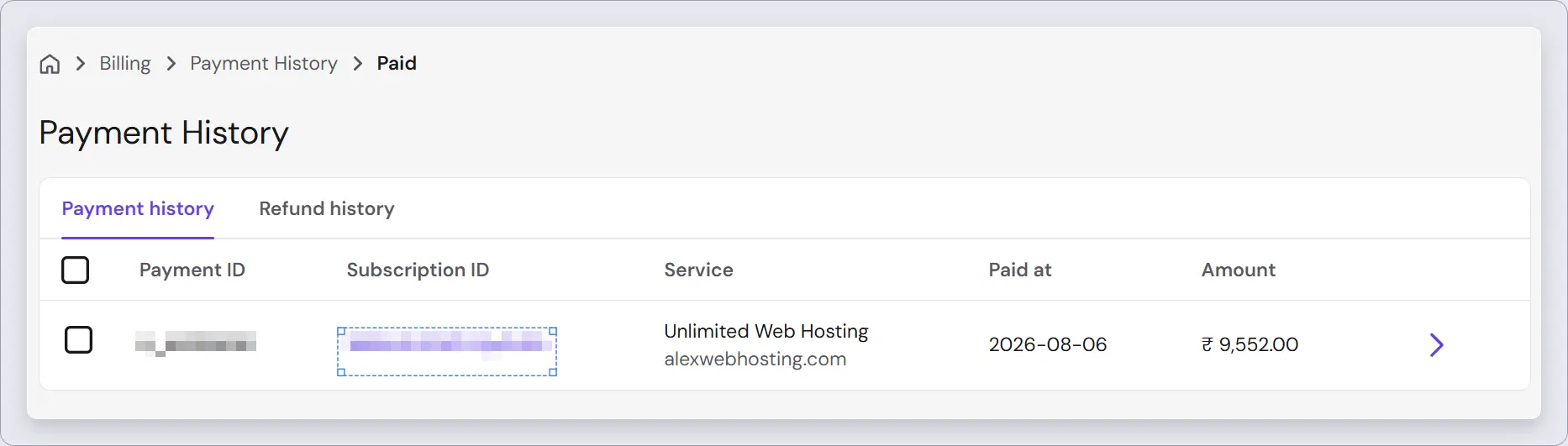
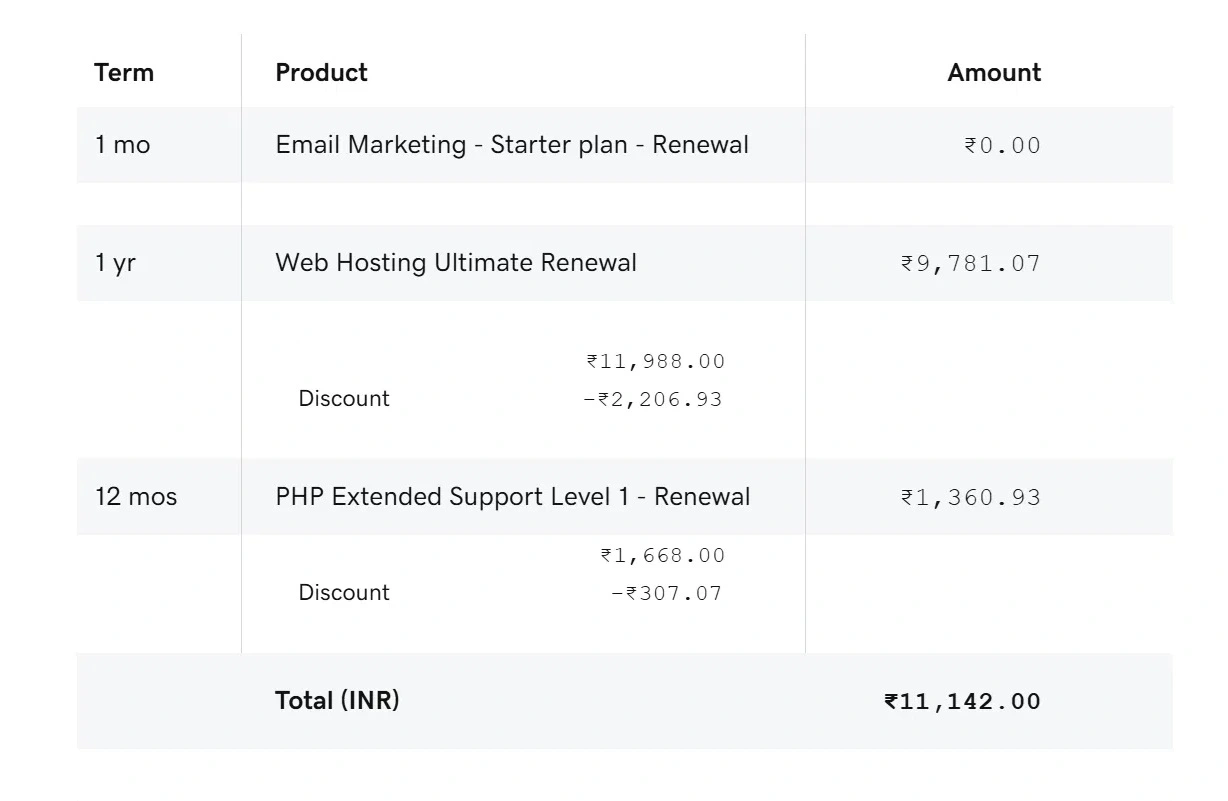
In 2025 I paid GoDaddy ₹11,142 for one year of the Ultimate plan. That bill also had a PHP Extended Support charge, which GoDaddy adds when your site is on an old PHP version. In August 2026 I paid Hostinger ₹9,552 for 48 months of their Unlimited plan, which is ₹199 a month. Their plan page shows ₹249 a month today, so the exact price you get depends on the offer running when you buy.
Now the part most people forget. My Hostinger account already shows the next renewal, ₹31,152 for another 48 months. That is ₹649 a month, or ₹7,788 a year, about 3.3 times what I paid this time. So Hostinger also has a big renewal jump. But even after that jump, one year on Hostinger will cost me less than the ₹11,142 I paid GoDaddy for one year.

The full story of why I left GoDaddy is in my GoDaddy review.
Both hosts show a low monthly price that needs a long term. Hostinger’s lowest price needs 48 months, and GoDaddy’s lowest price needs 36 months. Because the terms are different, the monthly price alone doesn’t compare fairly. So I calculated what you pay for the same six years on each host, the first term plus the renewal after it.
| Plan | HHostinger | GDGoDaddy |
|---|---|---|
| Entry plan | Premium, 3 sites | Economy, 1 site |
| Intro price | $2.99/mo for 48 months | $5.99/mo for 36 months |
| You pay at checkout | $143.52 | $215.64 |
| Renewal | $10.99/mo | $11.99/mo |
| 6 years in total | $407.28 | $647.28, plus SSL from year 2 |
| Middle plan | Unlimited, unlimited sites | Deluxe, 10 sites |
| Intro price | $3.99/mo for 48 months | $7.99/mo for 36 months |
| Renewal | $16.99/mo | $16.99/mo |
| 6 years in total | $599.28 | $899.28 |
| Top shared plan | Cloud Startup, unlimited sites | Ultimate, 25 sites |
| Intro price | $7.99/mo for 48 months | $12.99/mo for 36 months |
| Renewal | $25.99/mo | $21.99/mo |
| 6 years in total | $1,007.28 | $1,259.28 |
Hostinger prices from hostinger.com/web-hosting (“Renews at” on each plan card), GoDaddy prices from godaddy.com/hosting/web-hosting (the struck price, which is the renewal price I saw in GoDaddy’s cart). USD before tax, checked October 2026.
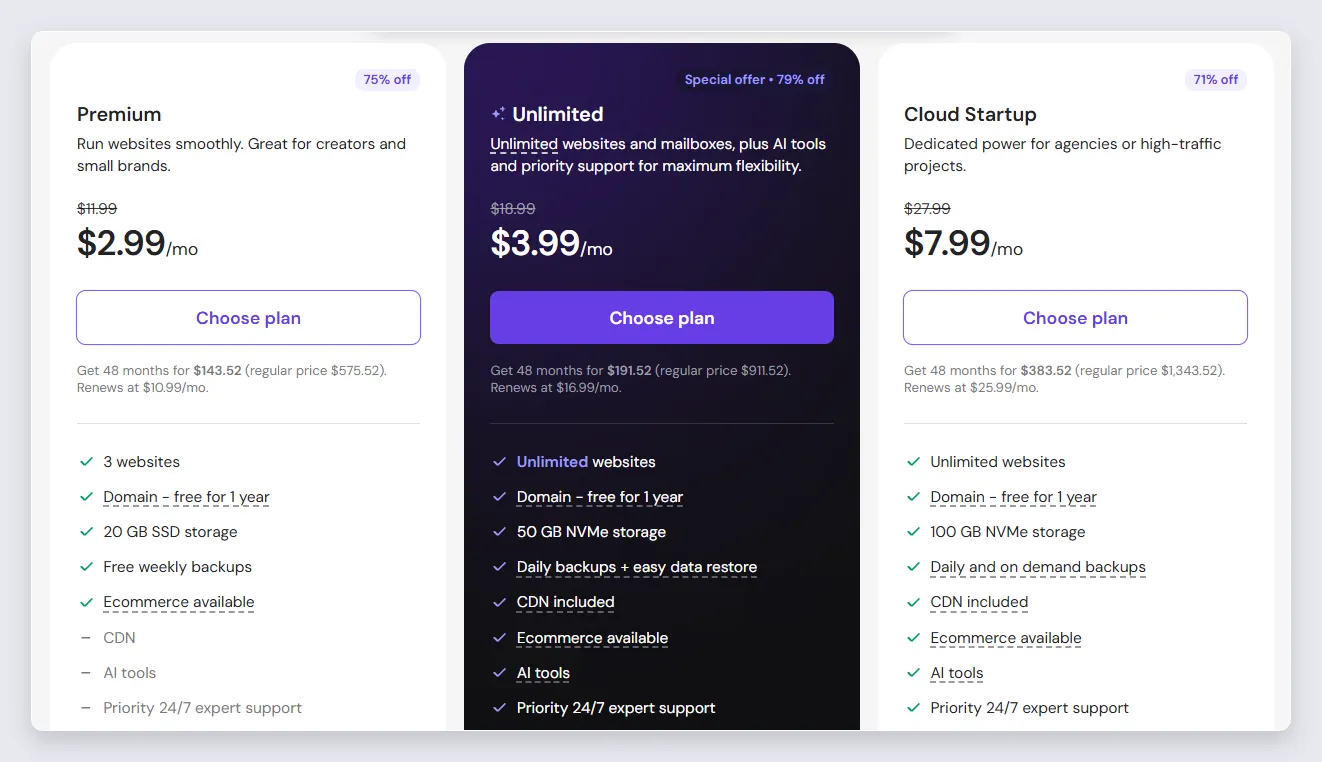
Hostinger is cheaper in every six-year total, but look at where the saving comes from. At renewal, Hostinger Unlimited and GoDaddy Deluxe cost the same $16.99 a month, and GoDaddy Ultimate renews lower than Hostinger Cloud Startup. So most of Hostinger’s saving comes from a lower price for a longer first term. If you plan to keep your site for ten years, the renewal rows matter more than the intro rows.
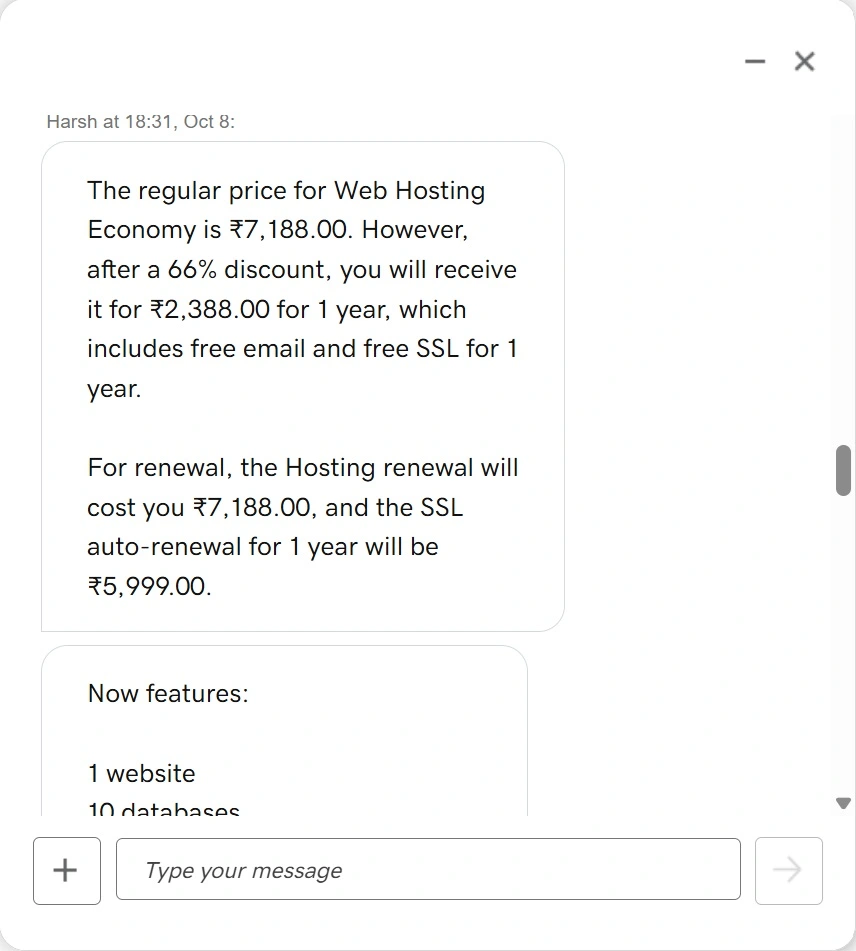
The entry plans are where the gap is biggest. Hostinger Premium is lower than GoDaddy Economy at the start and at renewal, it allows 3 websites against 1, and it includes SSL every year. On GoDaddy Economy the SSL is free only for the first year. GoDaddy’s sales chat told me the SSL renewal is ₹5,999 a year in India, which is almost as much as the hosting renewal itself.
One more thing about the 48-month price. You pay all four years at checkout. If you don’t want to pay that much at once, Hostinger also sells 12-month terms. When I checked Premium for my cheap yearly hosting page, it was $3.99 a month for 12 months, renewing at $10.99.
Hostinger Premium is ₹149 a month for 48 months and renews at ₹449. GoDaddy Economy is ₹219 a month for 36 months and renews at ₹599, and then the SSL renewal comes on top. Over six years, Hostinger Unlimited comes to ₹27,528 and GoDaddy Deluxe to ₹42,408, before 18% GST. GoDaddy India also sells Starter at ₹89 a month, but it has no free domain or email, which I explain on my GoDaddy $1 hosting page.
This table puts the two entry plans side by side, because most people buying a first website compare these two. Where a feature changes on the bigger plan, I have noted it in the same cell.
| Feature | HPremium | GDEconomy |
|---|---|---|
| Websites | 3 (unlimited on Unlimited) | 1 (10 on Deluxe) |
| Storage | 20 GB SSD (50 GB NVMe on Unlimited) | 25 GB NVMe |
| RAM and CPU | 2 GB RAM, 1 CPU core (3 GB and 2 CPUs on Unlimited) | 512 MB RAM, CPU not given |
| Free SSL | All years | Year 1 only |
| Free domain | Year 1 | Year 1 |
| 2 mailboxes per site, free for year 1 | Free email, term not stated on the plan | |
| CDN | Not on Premium, included on Unlimited | Not listed on the plan |
| Backups | Weekly (daily on Unlimited) | Daily, restore previous day |
| Control panel | hPanel | cPanel |
| Free migration | Yes | No answer from sales chat |
| Phone support | No, 24/7 chat and email | Yes, 24/7 |
| Uptime guarantee | Not stated on the plan page | 99.9% |
| Money-back | 30 days | 30 days |
From both plan pages (October 2026) and the two sales chats. RAM, CPU and the Premium CDN answer come from the sales chats, because neither plan page lists them.
The RAM row is the one that surprised me. Hostinger’s chat said Premium gets 2 GB RAM, and Unlimited gets 3 GB with 2 CPUs. GoDaddy’s chat said Economy gets 512 MB RAM. RAM is what your WordPress site uses when many visitors open pages at the same time, so on a busy site 512 MB runs out much earlier. Both numbers come from sales chats, not from the plan pages, so they can change.
GoDaddy wins two rows that matter. Economy gives you a daily backup, while Hostinger Premium gives a weekly backup and you need Unlimited for daily. And GoDaddy has 24/7 phone support, which Hostinger doesn’t offer on any plan. If you are the kind of person who wants to call someone when the site is down, this is a real reason to choose GoDaddy.
Both hosts give you a few things free for the first year only. These are the ones to add to your renewal math:
The Hostinger email point is easy to miss. The plan card says “free for 1 year”, and their chat told me the business email may renew separately after the trial. Hostinger didn’t give me that renewal price, so if you use email on your own domain, ask for it before the first year ends.
This is where my own experience on both hosts is most useful, because the two control panels are very different.
GoDaddy uses cPanel, the same control panel that most hosting companies have used for many years. If you have used cPanel before at any host, you will feel at home on GoDaddy from the first day. Every option is in a grid of icons, and the guides you find on Google for cPanel work the same here.
Hostinger uses its own control panel, called hPanel, and it doesn’t look like cPanel at all. When you open hPanel, the main thing you see is a chat box with their AI agent. If you are using it for the first time, it will take you some time to learn where each option is. You can ask the agent, and it tells you where to find the option you are looking for.
The good thing is that the agent can also do many tasks for you. For example, if you want WordPress installed on your domain, you just tell the agent and it installs it for you. For a beginner who doesn’t want to learn a control panel, this is a big help. Their AI assistant has solved almost every problem I had so far, and I haven’t needed to talk to a human yet.
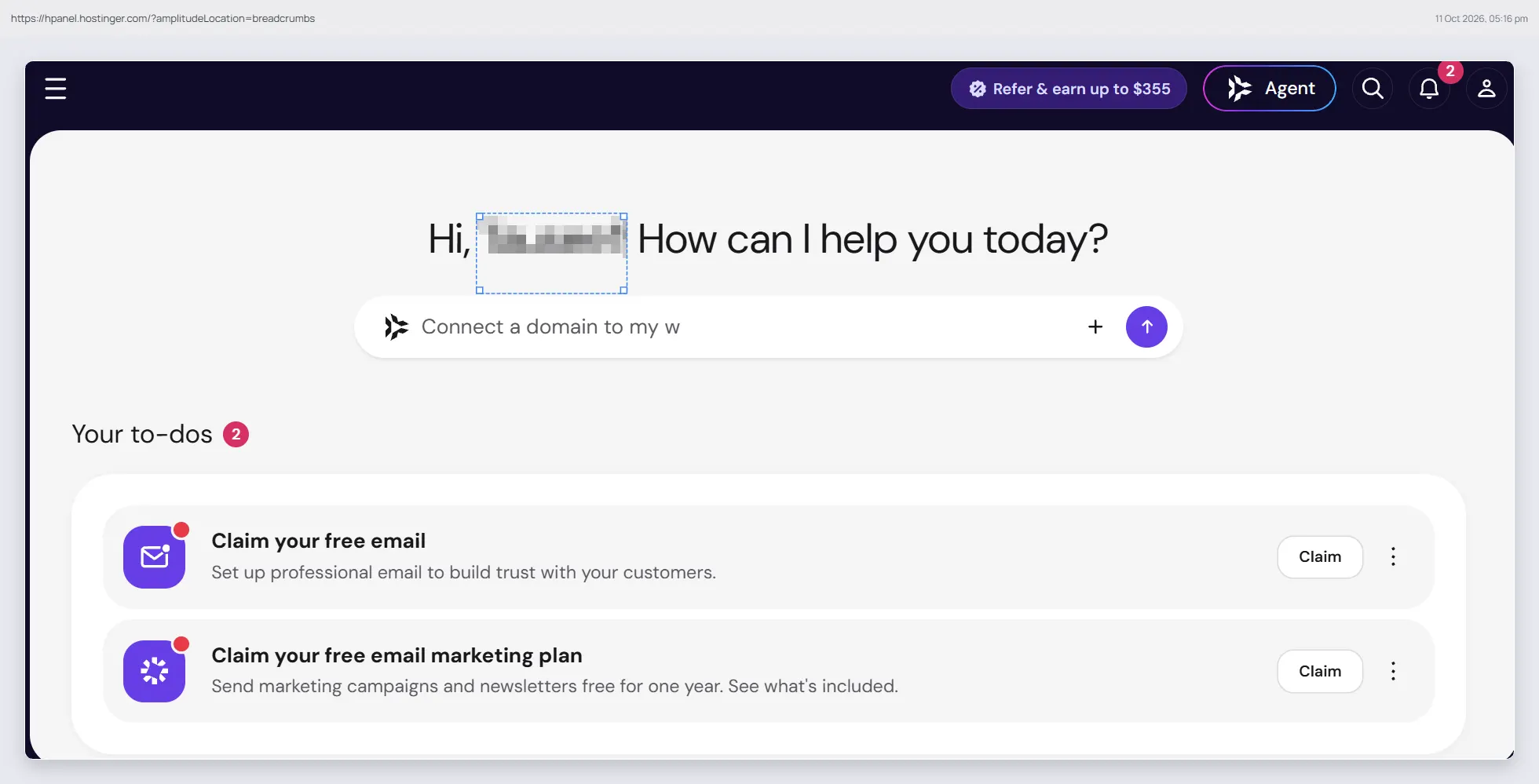
So if you already know cPanel, GoDaddy will feel easier. If you are new to hosting and you are fine typing what you want to an AI agent, Hostinger will feel easier.
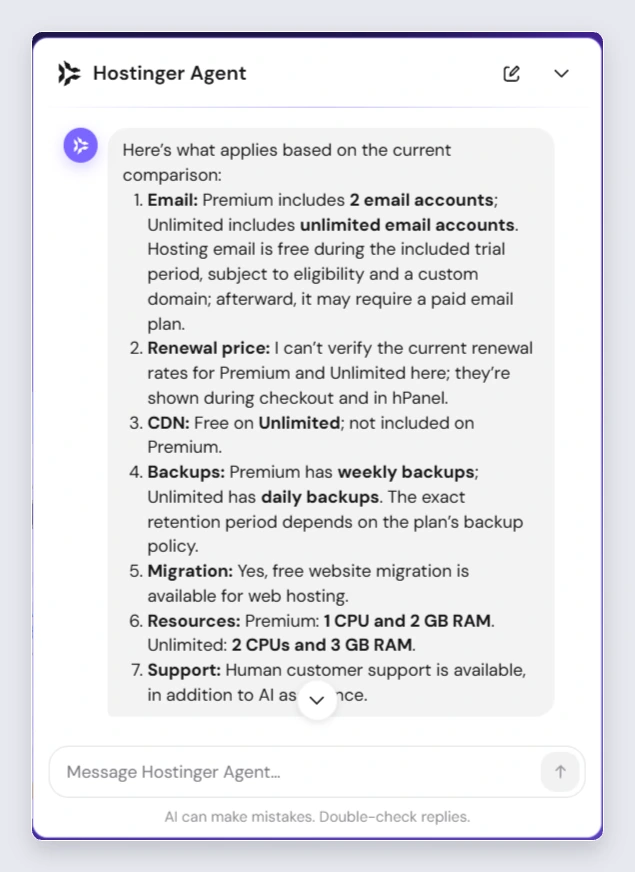
I asked both sales chats the questions a buyer should ask before paying: renewal price, backups, free migration and the CPU and RAM limits. I also asked GoDaddy about SSL after year one, and I asked Hostinger about email and CDN.
| Question | Hostinger chat | GoDaddy chat |
|---|---|---|
| Renewal priceMost important | Premium $10.99/mo, Unlimited $16.99/mo | Economy ₹2,388 for year 1, then ₹7,188/yr plus ₹5,999 SSL |
| Backups | Weekly on Premium, daily on Unlimited. How many days are kept: not given | No answer |
| Free WordPress migration | Yes | No answer |
| CPU and RAM | Premium 1 CPU, 2 GB. Unlimited 2 CPUs, 3 GB | 512 MB RAM, CPU not given |
| 2 or unlimited mailboxes, free for 1 year | Not asked | |
| CDN | Not on Premium, included on Unlimited | Not asked |
| SSL after year one | Not asked, free on all plans | Free for year 1 only |
GoDaddy India sales chat, 8 October 2026. Hostinger sales chat, October 2026. Hostinger quoted USD prices for a 12-month purchase.
Hostinger’s answers came from their AI assistant, all in one reply. The only gap was backup retention. It said how often the backups run, but not how many days of backups are kept. When I asked if a human is also available, it said human support is available 24/7 by live chat and email, and that phone support isn’t available.
On GoDaddy a human agent joined after 5 minutes, answered one question, and then asked if he should help me with my purchase. I had to ask the rest again, and three questions were left without a full answer. GoDaddy does have phone support, which Hostinger doesn’t. But as a GoDaddy customer for many years, I found the phone wait very long every time I called, so I would not count on it too much.
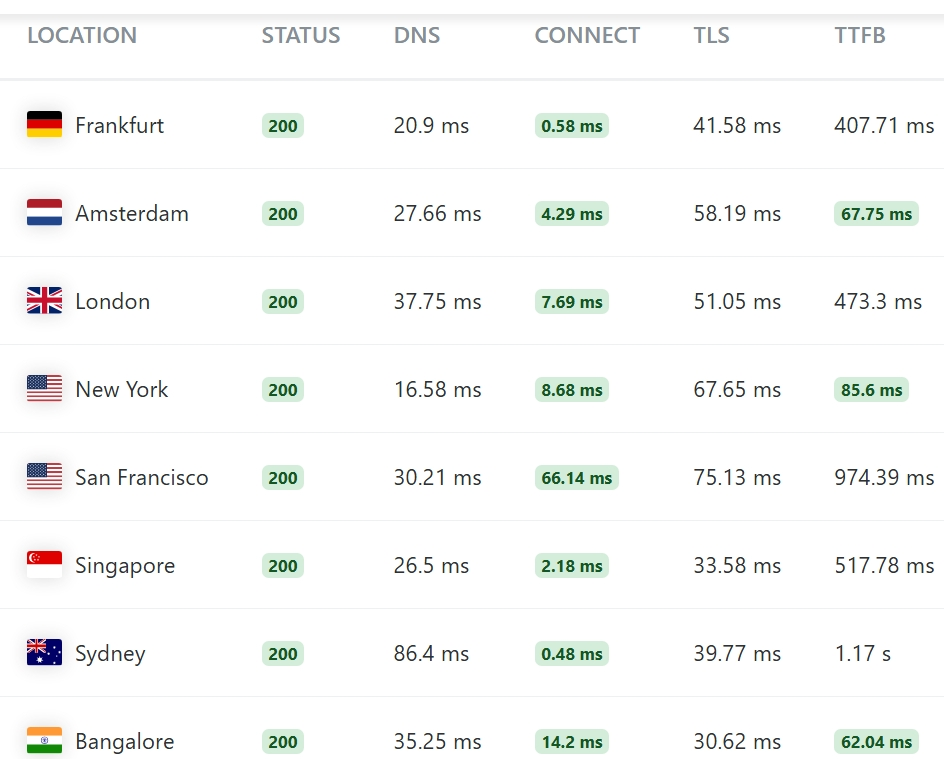
I measured TTFB (time to first byte) with the KeyCDN Performance Test from 8 cities. TTFB is how long the server takes to start sending the page, so it shows the hosting speed more than the design of the site. For GoDaddy I tested four live sites hosted there. For Hostinger I tested two of my own sites, which are on my Unlimited plan.
| Median TTFB | Hostinger | GoDaddy |
|---|---|---|
| US (New York, San Francisco) | 841 ms | 859 ms |
| Europe (Frankfurt, Amsterdam, London) | 489 ms | 740 ms |
| Singapore | 535 ms | 64 ms |
| India (Bangalore) | 329 ms | 183 ms |
| Australia (Sydney) | 1,074 ms | 765 ms |
GoDaddy: median of 4 live sites, 8 October 2026. Hostinger: median of 2 live sites, 11 October 2026. Lower is better.
Three of the four GoDaddy sites were on GoDaddy’s Singapore server. So they were very fast from Singapore and India, and took 0.5 to 1 second from the US and Europe. Google’s guideline for a good TTFB is under 800 ms.
| Hostinger site | Frankfurt | London | New York | San Francisco | Singapore | Bangalore | Sydney |
|---|---|---|---|---|---|---|---|
| Site 1 | 513 ms | 540 ms | 686 ms | 824 ms | 524 ms | 77 ms | 1,240 ms |
| Site 2 | 451 ms | 486 ms | 861 ms | 857 ms | 546 ms | 580 ms | 909 ms |
KeyCDN Performance Test, one run per location, 11 October 2026. Amsterdam results are in the medians but not shown in the table.
My two Hostinger sites answered in about 450 to 550 ms from Europe and Singapore, 690 to 860 ms from the US, and 0.9 to 1.2 seconds from Sydney. From Bangalore, Site 1 answered in 77 ms and Site 2 in 580 ms. Both sites are on my Unlimited plan, on Hostinger’s data center in India, which is why Site 1 was so fast from Bangalore. With one run per city, I can’t say for sure why Site 2 was slower from India in this test.
One more thing I noticed. The connection to both sites took less than 70 ms from every city, even from Sydney. That usually happens when a CDN sits in front of the site, and Hostinger’s CDN is included on my plan. But the page itself still has to come from the main server, which is why the TTFB is much higher than the connection time.
So in my test Hostinger was faster from Europe and about the same from the US, while GoDaddy’s Singapore-hosted sites were faster in Asia and Australia. From the US, both hosts were just over Google’s 800 ms guideline.
The real lesson from this test is that speed follows the server location. My Hostinger sites are on an India server and three of the GoDaddy sites are on a Singapore server, so each host was fastest in the region near its own server. Both companies have servers in more than one region. So choose the data center nearest to most of your visitors, and the speed difference between these two hosts will matter much less than this table shows.
The bigger point is that speed on shared hosting depends mostly on where the server is, and this is where the two hosts are different. I explain that in round 7.
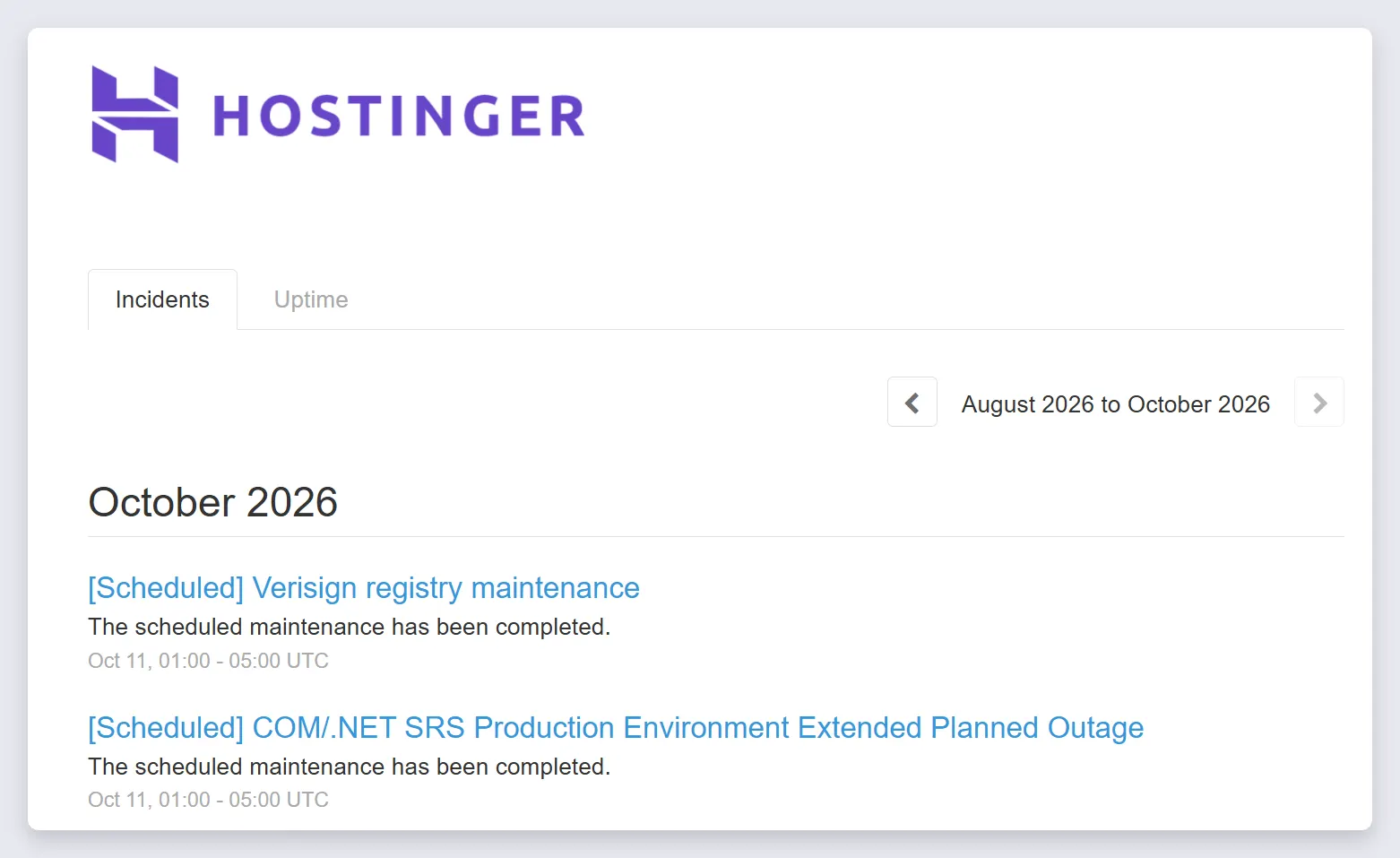
Both hosts have a public status page, and the main page of both shows only about the last two weeks. So I compared the same two weeks on both, 26 September to 10 October 2026. The two pages look very different, and the difference is in how they report, not only in how many problems they had.
GoDaddy listed two incidents in those two weeks. The web hosting dashboard was slow for 27 minutes on 27 September, and GoDaddy.com itself was slow for 29 minutes on 7 October. Neither of them took hosted websites down.
Hostinger’s page is much busier, because Hostinger posts a separate entry for each server, with names like “Degraded Server US-1066 Performance”. Each of these entries is about one server, so it hits only the websites on that server. These are the hosting entries from the same two weeks:
| What Hostinger reported | Entries | How long each |
|---|---|---|
| Emergency maintenance on one server | 10 | 9 min to 1 h 26 min |
| Slow server (“degraded performance”)Longest | 5 | 15 min to 3 h 7 min |
| Partial connectivity loss to the Mumbai data center | 2 | 40 min and 1 h 13 min |
| Planned maintenance on servers | Almost every day | Mostly 1 to 4 hours, posted up to 3 weeks before |
From statuspage.hostinger.com, checked 11 October 2026. Length is from the first to the last update of each entry. Server entries for hosting and VPS. Website Builder and domain registry entries are not included.
So more entries on Hostinger’s page means more detail, not more downtime. The longest one was a slow US server for about three hours on 8 October. If your visitors are in India, note the two Mumbai connectivity problems in the same week. The planned maintenance is announced weeks before, but the page shows the time window, not if sites go offline during it.
From two weeks of status pages I can’t say which host has less downtime, so this round has no winner. GoDaddy’s plan page promises 99.9% uptime, which allows about 44 minutes of downtime in a month. Hostinger’s plan page doesn’t mention an uptime guarantee. If you want a real number for your own site, put it on a free uptime monitor like UptimeRobot for a month. It will tell you more than any status page.
This round decides the speed your visitors get, and it is a clear win for Hostinger. Hostinger lets you choose your data center when you set up the plan. For web hosting these are the locations Hostinger lists:
| Region | Hostinger data centers |
|---|---|
| North America | USA (Phoenix, Boston, Asheville) |
| Europe | United Kingdom, France, Germany, Netherlands, Lithuania |
| Asia | India, Indonesia, Malaysia |
| South America | Brazil |
From Hostinger’s help page on server locations, October 2026.
If you pick the wrong one, you can also move an active plan to another data center later from the Plan Details page in hPanel. Hostinger’s help page says you may not be able to move back to the original location, so choose the one nearest to most of your visitors.
GoDaddy has data centers in North America, Europe and Asia, but you don’t pick one on the plan page. In my speed test, three of the four GoDaddy sites were on a Singapore server, which is great for Asia and slow for the US. So if you buy GoDaddy, ask sales which data center your account will be on before you pay.
Both hosts charge much more after the first term. If the renewal is your main worry, or you want cPanel with a lower price than GoDaddy, look at these two:
For cPanel with a low renewal price. It starts at $2.50 a month and renews at $8 (or $7 on their DirectAdmin plan), and InterServer says the price doesn’t go up after that.
For cPanel and 10 sites on the cheapest plan, with free SSL and CDN. Its servers are in the US.
Start with the lower renewal and the plan that fits your number of websites. Both hosts give you a 30-day money-back guarantee, so you can try one and leave if it doesn’t suit you.
For most people, yes. Hostinger Premium costs $2.99 a month and renews at $10.99, allows 3 websites, includes SSL every year and gets 2 GB RAM. GoDaddy Economy costs $5.99, renews at $11.99, allows 1 website and charges for SSL after year one. GoDaddy is better if you want phone support or a daily backup on the cheapest plan.
Hostinger. Over six years, Hostinger Premium comes to $407.28 and GoDaddy Economy to $647.28, before tax and before GoDaddy’s SSL renewal. In my own case, four years on Hostinger Unlimited cost ₹9,552, less than the ₹11,142 I paid GoDaddy for one year.
On the entry plan, yes, $10.99 a month against $11.99. On the middle plans they are the same, Hostinger Unlimited and GoDaddy Deluxe both renew at $16.99. GoDaddy Ultimate renews lower than Hostinger Cloud Startup, $21.99 against $25.99.
It depends mostly on where the server is and where your visitors are. In my test, Hostinger answered in 489 ms from Europe against 740 ms on GoDaddy, and both were about 850 ms from the US. GoDaddy’s Singapore-hosted sites were much faster in Asia, 64 ms from Singapore against 535 ms on Hostinger.
No. Hostinger shared plans use their own control panel, hPanel, which opens with an AI agent that can guide you or do tasks like installing WordPress. GoDaddy uses cPanel, so it is easier if you already know cPanel.
No. Hostinger offers 24/7 live chat and email, and its sales chat confirmed that phone support isn’t available. GoDaddy has 24/7 phone support, but in my years as a customer the phone wait was very long.
For the first year. Premium includes 2 mailboxes per website and Unlimited includes unlimited mailboxes, both free for 1 year. After that, Hostinger’s chat said the email may renew separately, so ask for the price before the year ends.
Yes. Hostinger’s plan page lists free website migrations, and their sales chat confirmed WordPress migration is free. I moved alexwebhosting.com from GoDaddy to Hostinger in 2026.